
How to read the demo sales list
To understand how the pricing tool works, we recommend walking through specific cases step-by-step within the demo sales list.
Example: Row 7
„The customer Wolf (France) wants to purchase product J five times. …
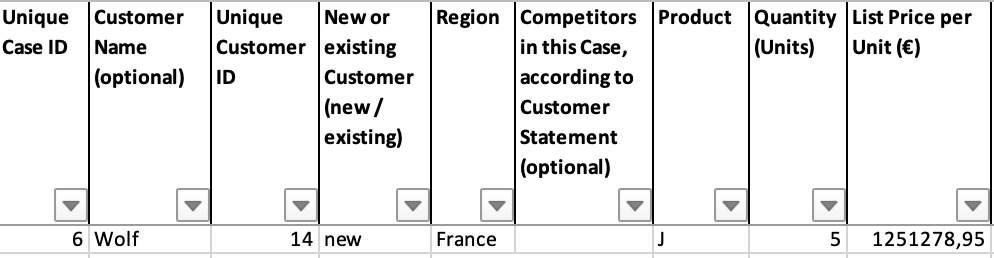
Afterwards the sales team estimates an 80% need fit as well as an 80 % probability of closing and initially plans a discount of 20.18 %. The AI tool suggests a discount of 19.25 %. Based on this, a final discount of 19.7 % is agreed upon. …
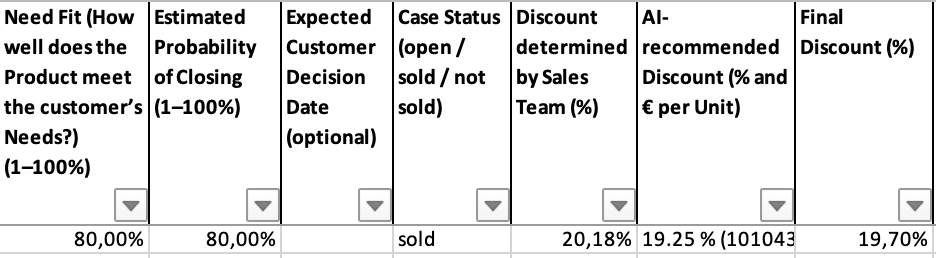
The sale was successful, and by incorporating the AI recommendation, an additional revenue gain of +0.48 % was achieved.“

Key points for your analysis:
- Exploration: Follow this logic for other „sold“ and „not sold“ cases to see the tool’s consistency.
- Transparency: In particular, you could look at cases where a loss occurred due to the AI-recommended discount (i.e., where there is a negative income, e.g., in rows 71 and 242)
- Neutrality: In rows 3, 4, and 6, the AI recommendation had no effect (Income = 0).
- Guidance: Pay attention to the AI Note column (e.g., in row 5). This field clearly indicates if specific data is missing to generate a recommendation.
What the pricing tool adds to your sales list
The pricing tool integrates directly with your existing sales structure and automatically adds six additional columns:
- 2 types of AI-recommended discount (%)
- 1 AI note
- 3 types of resulting Income gain or loss (€)
Note: To calculate the recommendation, the tool requires 11 mandatory input fields. This demo also includes 5 optional columns, demonstrating how the tool can be customized to match your internal sales structure
Standard workflow
- Inquiry: The sales team enters the case details and discusses an initial discount within the sales list.
- Pricing tool execution: The tool generates the AI-recommended discount for all open cases.
- Decision: The final discount is determined by evaluating the AI recommendation alongside the initial discount.
- Closing: Customer decisions (Sold / Not Sold) are recorded in the list.
- Pricing tool execution: The tool calculates the actual additional income gain for all closed cases.
The pricing tool can be executed at any stage of the process. If required information is missing or something else is wrong in the sales list for a specific case, the AI Note column clearly indicates it.
The Result: In our underlying case study of a medium-sized industrial company, this method led to a total margin increase of over 2% — a result that aligns with industry benchmarks from McKinsey & Company, who report margin improvements of 2% to 7% through systematic pricing excellence.